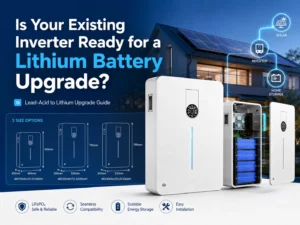
Replacing lead-acid storage with lithium can work well, but disconnect the old bank only after the inverter has been checked. For a lithium ion battery for inverter use, the voltage printed on the label is only a starting point. Charge limits, battery current, BMS communication, DC protection, and planned expansion decide whether the present inverter can stay.
Before installation, decide which of three paths applies: retain the inverter, change its lithium settings, or replace it. That decision prevents an unnecessary hardware purchase and avoids connecting a lithium bank to controls intended for lead-acid chemistry.
Start With the Inverter’s Lithium Limits
Nominal Voltage Is Only a Screening Check
A 48V label on both units sounds reassuring, but it does not finish the compatibility check.
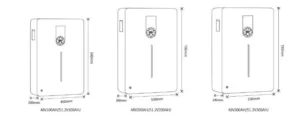
The inverter must also cover the battery’s real operating window. Jarrett’s JREK-48200 is a 48V, 200Ah LiFePO4 battery rated at 9.6kWh, with a 40.5V–54V working range. The JREK-51.2200 is a 51.2V, 200Ah model rated at 10.24kWh and operating from 43.2V to 57.6V.
For a lithium ion battery for inverter 200ah purchase, “200Ah” describes charge capacity; voltage determines stored energy and whether the inverter’s charge and discharge limits line up.
Buyers comparing upgrade options can review Jarrett’s lithium battery range alongside the existing inverter specifications before selecting a replacement bank.
Settings That Define a Compatible Inverter
A lithium battery compatible inverter has to keep charging and discharging inside the battery’s limits. The useful checks are adjustable charge voltage and current, low-voltage cutoff, restart voltage, and the selected battery type or charging mode.
The important word is adjustable. A “Lithium” entry in a menu proves little by itself, while an older lead-acid-oriented menu does not automatically rule the inverter out. The actual settings must be configurable for the battery being installed.
Put the battery data sheet beside the inverter manual and compare those settings directly.
Read the 200Ah Battery as an Energy Source
Convert Ah Into Usable Energy
Searches for lithium ion battery for inverter 200ah often focus on Ah, although Ah alone does not size the system.
For Jarrett’s Power Wall range:
| Model | Voltage | Capacity | Standard Energy |
| JREK-48200 | 48V | 200Ah | 9.6kWh |
| JREK-51.2200 | 51.2V | 200Ah | 10.24kWh |
Both models list an 80% suggested depth of discharge. Plan with usable kWh, because a 200Ah lithium bank is not automatically a one-for-one replacement for a 200Ah lead-acid bank.
Jarrett’s Power Wall LFP battery also covers 100Ah, 200Ah, and 300Ah configurations in both 48V and 51.2V ranges, so project sizing can follow actual energy demand rather than a fixed Ah number.
Match Battery Current to Inverter Demand
Capacity indicates runtime; current indicates whether the battery can deliver the required power.
The JREK-48200 and JREK-51.2200 each specify 100A standard discharge and 100A standard charge current. Compare those limits with the inverter’s DC demand and charging capability.
Higher inverter output normally draws more DC-side current. A buyer choosing a lithium ion battery for inverter system should read inverter wattage and battery current limits together.
This matters especially when the battery bank and inverter output are both being increased.
Treat BMS Communication as a Separate Layer
What the BMS Link Must Exchange
The BMS manages cell voltage, current, temperature, and protection, and can pass those limits to the inverter through the communication link.
Jarrett’s JREK Power Wall series supports RS232/CAN communication. That provides a strong basis for system integration, but the inverter still needs to use the required communication method and settings.
A lithium battery compatible inverter has two compatibility layers:
- electrical compatibility between battery and inverter;
- communication compatibility between the BMS and inverter control system.
If either layer is skipped, the system may power up without exchanging the limits reported by the BMS.
A CAN Port Does Not Prove a Match
Two products may both carry a CAN port without sharing the same communication settings. The protocol, cable pinout, inverter battery profile, and system configuration still have to agree.
With several batteries in parallel, the inverter needs a reliable view of the whole bank.
Jarrett combines lithium batteries with an off-grid hybrid inverter range, allowing buyers to review battery voltage, inverter power, PV input, monitoring, and communication as one system.
Plan the DC Connection Before Wiring
Checks Before the First DC Connection
People searching how to connect lithium ion batteries to inverter equipment often start with cable terminals. Begin with the electrical design instead.
Before connection, confirm:
- battery nominal and working voltage;
- inverter DC input range;
- expected charge and discharge current;
- cable size and cable length;
- fuse or DC breaker rating;
- polarity;
- grounding requirements;
- BMS communication;
- inverter charging settings.
High-current DC systems need correctly sized protection and conductors. The objective is correct behavior at full load, during charging, and as the battery approaches its operating limits, not merely getting the inverter to switch on.
Commissioning After the Wiring Is Complete
A proper how to connect lithium ion batteries to inverter procedure ends with commissioning, not with the last cable connection.
After installation, verify battery voltage, inverter recognition, charge current, discharge operation, BMS communication, low-voltage behavior, and monitoring data.
Jarrett’s JAXM inverter series provides 4.5kW and 6.5kW versions with built-in MPPT control, pure sine wave output, LCD touch controls, cold start, auto-restart, and a 120-500VDC PV input range. Buyers planning a broader system upgrade can compare these functions through the JAXM inverter system rather than treating battery replacement as an isolated component change.
Leave a Controlled Path for Expansion
Conditions for Adding Batteries Later
A frequent upgrade question is whether more batteries can be added to the inverter after the first installation.
Many lithium storage systems can be expanded, but only when the inverter, battery architecture, protection hardware, and communications are rated for the larger bank. More storage changes energy and may change available charge and discharge current, so check the surrounding equipment at the same time.
Jarrett’s JREK Power Wall batteries support up to 15 units in parallel, giving installers a defined route from an initial bank to a larger one when compatible units are used.
The 48V series ranges from 4.8kWh at 100Ah to 14.4kWh at 300Ah per unit. The 51.2V series ranges from 5.12kWh to 15.36kWh.
When Expansion Affects the Rest of the System
The question “can I add more batteries to my inverter?” is really a question about the limits of the whole expansion.
A larger battery bank may require a review of:
- inverter charging current;
- total battery-bank current;
- DC breaker and fuse ratings;
- busbar capacity;
- cable size;
- BMS communication;
- solar charging capacity;
- expected recharge time.
Adding storage without checking charging capacity can leave plenty of stored energy but make the recharge window unacceptably long.
If expansion is likely, size the inverter, battery bank, and PV array as one plan from the beginning.
Decide Whether the Inverter Stays
When Retaining or Reconfiguring Works
Keep the inverter when its DC voltage range, charging capability, output power, and battery-control functions already fit the new lithium battery.
Reconfigure it when the hardware is suitable but charging current, charge voltage, low-voltage cutoff, or battery communication settings need adjustment.
This route often preserves the useful parts of the existing system while improving the battery technology.
For a lithium ion battery for inverter retrofit, actual operating parameters matter more than the inverter’s age by itself.
When Replacement Brings More Value
Replace the inverter when the project also needs higher AC output, wider PV input capability, integrated MPPT, improved monitoring, lithium-oriented battery control, or future storage expansion.
In that situation, a new inverter is part of designing around current and future loads, rather than a correction after a failed battery swap.
Zhejiang Jarrett Solar Technology Co., Ltd. supplies solar modules, controllers, inverters, lithium batteries, and integrated photovoltaic solutions. Its service scope includes consulting, design, system integration, installation, commissioning, and operation support. Project buyers can discuss system requirements with Jarrett using the existing inverter model, required backup time, PV capacity, load profile, and planned battery capacity as the starting information.
Conclusion
Treat the inverter and battery as one electrical system during a lead-acid-to-lithium upgrade. Verify voltage, charging behavior, current, usable energy, BMS communication, DC protection, and expansion before deciding what stays. In a lithium ion battery for inverter 200ah project, 48V/200Ah and 51.2V/200Ah batteries have different voltage and energy values despite the same Ah label. Keep the inverter when its limits fit, change its settings when the hardware is suitable, and replace it when lithium integration, PV control, or future expansion calls for new equipment.
FAQs
Q1: What should I check when choosing a lithium battery compatible inverter?
A1: Compare the battery’s working-voltage range, charge voltage and current, inverter DC requirements, low-voltage cutoff, BMS communication, and required output power. The inverter needs to suit both the battery parameters and the intended load.
Q2: Is a 200Ah lithium battery suitabl for an existing inverter?
A2: It can, if voltage, current, and charging requirements line up. Jarrett’s 48V 200Ah JREK-48200 provides 9.6kWh; the 51.2V JREK-51.2200 provides 10.24kWh. The inverter and required backup energy determine which one is appropriate.
Q3: Can I add more batteries to my inverter after installation?
A3: Yes, when the battery system, inverter, DC protection, charging capacity, and communication architecture are sized for expansion. Jarrett’s JREK Power Wall range supports up to 15 units in parallel, so storage can grow with the project.